
Verizon Reviews, Complaints and Customer Service Issues
Verizon provides mobile phone service, wireless devices, 5G and LTE connectivity, Fios fiber internet, fixed wireless home internet and related telecommunications services. This page examines Verizon reviews and complaints involving billing, trade-in promotions, customer support, unauthorized accounts, internet reliability, device returns and service cancellation.
Quick Verdict: Verizon is an established national telecommunications provider, but the reviews currently published on ZeroStars are overwhelmingly negative. The most frequent concerns involve promotional trade-in credits, unexpected or continued billing, difficulty obtaining a clear resolution from customer service, unauthorized accounts and problems with Fios or home internet service.
Verizon Reviews and Complaints
As of July 21, 2026, ZeroStars has nine published Verizon reviews and an overall rating of -4.4 stars.
This is a strongly negative result, although nine reviews remain a relatively small sample compared with Verizon’s overall customer base. The rating should be considered a summary of the experiences submitted to ZeroStars rather than proof that every Verizon customer will have the same outcome.
Current Verizon Complaint Themes on ZeroStars
The reviews currently published on this listing discuss:
- Trade-in promotional credits: Reviewers say promised credits were not applied or were significantly lower than they expected.
- Repeated customer-service contacts: Several reviewers describe speaking with multiple representatives without obtaining a final resolution.
- Billing after returning devices: One review describes continued charges after phones were returned.
- Unauthorized accounts: A reviewer says an account that was not theirs was placed in collections under their name.
- Store-employee concerns: One reviewer alleges that a sales interaction involved misleading information and improper access to payment details.
- Fios television and internet problems: One reviewer describes picture pixelation, intermittent sound and unsuccessful support contacts.
- Prices and account changes: A longtime customer reports rising charges and increasingly difficult support experiences.
- Outside equipment: One reviewer reports difficulty notifying Verizon about damaged or exposed equipment near a residence.
These are allegations and personal experiences submitted by individual reviewers. ZeroStars has not independently verified every disputed transaction.
Verizon Trade-In Complaints
Trade-in promotions are the most consistent theme in the current ZeroStars reviews. Customers describe being promised substantial credits toward new phones but later receiving smaller credits, higher monthly charges or no promotional adjustment.
Verizon states that trade-in and device-promotion credits commonly take one or two billing cycles to appear. The amount can depend on the promotion, qualifying plan, device model, device condition, account status and whether all offer requirements remain satisfied.
Before Trading in a Phone
- Save a screenshot or printed copy of the complete promotion.
- Confirm the qualifying phone model, plan and trade-in device.
- Ask whether the credit is a one-time amount or a monthly credit spread across the device-payment term.
- Confirm whether changing plans or paying off the new phone early will end the promotion.
- Photograph the old phone from all sides before surrendering or shipping it.
- Record the IMEI or device identification number.
- Obtain a store receipt or shipping tracking number.
- Save the trade-in submission number and estimated value.
- Check the next two billing statements for the credit.
What to Do When a Verizon Trade-In Credit Is Missing
- Check the trade-in status through My Verizon.
- Confirm that Verizon received the device.
- Compare the promotion requirements with your current plan and account.
- Locate the original offer, receipt and tracking information.
- Contact Verizon and request a promotion or trade-in review.
- Ask for a case or escalation number.
- Request written confirmation of the expected credit and effective date.
- Compare each new bill until the promised adjustment appears.
Do not surrender the only copy of your receipt or shipping record. Keep documentation until every promotional credit has been applied for the complete promised term.
Review Verizon’s trade-in FAQs.
Verizon Billing Complaints
Billing complaints can involve more than the advertised monthly plan price. A Verizon bill may include:
- Plan charges for each line;
- Device-payment installments;
- Promotional credits;
- Insurance or device-protection plans;
- Streaming or subscription services;
- Taxes, surcharges and governmental fees;
- International or roaming usage;
- Late-payment charges;
- One-time activation or upgrade fees; and
- Charges from eligible third-party services billed through the Verizon account.
How to Investigate a Verizon Bill Increase
- Compare the current bill with the previous bill line by line.
- Check whether a promotional credit ended or failed to appear.
- Review each phone line separately.
- Look for newly added services, insurance or subscriptions.
- Check device-payment balances and upgrade charges.
- Confirm whether an Auto Pay or paper-free billing discount changed.
- Review international, roaming and premium-service charges.
- Save a copy of the bill before contacting support.
Verizon allows customers to view current and previous billing statements through My Verizon. Keep copies of the original bill, corrected bill, support chats and adjustment promises.
Review Verizon mobile billing and payment help.
How to Dispute a Verizon Charge
Begin by calling customer service or using authenticated support through My Verizon. Explain the disputed charge, billing date, amount and requested correction.
Verizon’s Mobile Customer Agreement states that customers may call to dispute billed charges. It also states that customers who want to preserve certain arbitration or small-claims rights must submit written notice to the customer-service address shown on the bill or complete Verizon’s formal Notice of Dispute process.
Billing Dispute Checklist
- The account number and affected mobile number;
- The date and exact amount of the charge;
- The bill page on which it appears;
- The reason the charge is disputed;
- Receipts, return records or promotional documents;
- Previous case and chat reference numbers;
- The correction or credit requested; and
- The deadline by which a response is needed.
Review the Verizon Mobile Customer Agreement.
Unauthorized Verizon Accounts and Identity Fraud
One ZeroStars reviewer reports that an unfamiliar Verizon account was opened under their name and later sent to collections. An unauthorized account should be handled differently from an ordinary billing disagreement.
Steps to Take When a Verizon Account Is Not Yours
- Do not provide account credentials in response to an unexpected call, email or text.
- Contact Verizon through its official website or published support number.
- Change passwords for Verizon, email and financial accounts that may be affected.
- Change the Verizon account PIN if an existing account may have been accessed.
- Enable two-factor authentication and Number Lock when applicable.
- Report identity theft to the appropriate law-enforcement agency.
- Submit Verizon’s official fraud claim with the requested documentation.
- Review credit reports for other unfamiliar accounts.
- Dispute inaccurate collection information with the credit-reporting agencies.
- Keep copies of police reports, fraud claims and correspondence.
Verizon says consumers reporting an unauthorized wireless account or account takeover may need a police report and other identity documentation. Use only Verizon’s official fraud-reporting system rather than sending sensitive identification to an unverified email address.
Verizon Customer Service Complaints
Several ZeroStars reviewers describe long calls, repeated transfers, inconsistent answers or promised corrections that did not occur.
Complex cases may involve several Verizon departments, including:
- Mobile billing;
- Trade-ins and promotions;
- Device payments;
- Fraud and account security;
- Fios billing;
- Home internet technical support;
- Returns and exchanges;
- Collections; and
- Executive or dispute-resolution teams.
How to Make a Support Contact More Effective
- Identify the specific service involved: mobile, Fios or Home Internet.
- Write a short timeline before calling.
- Have the bill, receipt, tracking number and promotion available.
- State the issue and requested resolution clearly.
- Ask the representative to read back the account notes.
- Request a case number before ending the contact.
- Save screenshots of chat conversations.
- Record the date, time and department contacted.
- Ask when the correction should appear.
- Escalate in writing if repeated contacts do not resolve the issue.
Verizon Fios and Home Internet Complaints
Verizon offers multiple home-service products, including Fios fiber service and wireless home internet. Customers should identify the exact service because equipment, support procedures and cancellation terms can differ.
Current ZeroStars feedback includes concerns about:
- Picture pixelation;
- Intermittent sound;
- Installation and technician visits;
- Automated troubleshooting that did not match the problem;
- Difficulty beginning a useful support chat; and
- Long telephone-support waits.
Before Contacting Verizon About Internet or TV Service
- Record when the problem occurs;
- Note whether every device or only one device is affected;
- Photograph error messages and equipment lights;
- Test a wired connection when appropriate;
- Record speed-test results at several times;
- Check for a local outage;
- Save technician appointment confirmations; and
- Ask whether a service credit is available for a qualifying outage.
Verizon Coverage and Speed Reviews
Wireless coverage and performance vary by location, building construction, congestion, device, plan and available network technology. A national coverage claim does not guarantee strong service inside a particular home, workplace or rural property.
Before switching carriers:
- Review Verizon’s coverage map for the addresses you use most.
- Ask nearby residents about current service.
- Check whether your phone supports the necessary network bands.
- Read the plan’s premium-data and hotspot terms.
- Test calls and data during the return period.
- Avoid relying exclusively on a salesperson’s verbal coverage estimate.
View Verizon’s current coverage map.
How to Cancel Verizon Mobile Service
Verizon currently allows customers to request mobile cancellation through customer service or authenticated chat in My Verizon. The Account Owner’s identity, account PIN or other verification information may be required.
Before canceling:
- Review remaining device-payment balances;
- Check whether promotional credits will stop;
- Port any telephone numbers you want to keep before closing the lines;
- Remove account add-ons and subscriptions;
- Download final bills and account records;
- Confirm the effective cancellation date;
- Ask whether charges continue through the end of the billing cycle; and
- Obtain written confirmation that the account or line was disconnected.
Review Verizon’s mobile cancellation instructions.
How to Cancel Verizon Fios
Verizon directs Fios customers to begin disconnection through the My Verizon account and a representative chat. Customers should confirm:
- The final service date;
- Any remaining contract obligations;
- Which routers, set-top boxes or other equipment must be returned;
- The equipment-return deadline;
- The correct return location or shipping method;
- Whether a final credit balance is expected; and
- The address where the final bill will be sent.
Keep equipment-return receipts and tracking information. Returning equipment does not necessarily cancel the service account by itself.
Review Verizon’s Fios cancellation instructions.
Verizon Device Returns and Exchanges
Verizon currently publishes a 30-day return and exchange period for qualifying mobile devices and accessories. Merchandise generally must be returned in like-new condition, and a restocking fee may apply.
Returning a phone does not automatically terminate the wireless line. Customers must separately confirm that service has been canceled when that is their intention.
Protect Yourself When Returning Equipment
- Back up and erase personal information.
- Disable device security and activation locks.
- Photograph the device and accessories.
- Obtain a detailed receipt.
- Keep the tracking number.
- Confirm when Verizon records the return.
- Check the next bill for device charges or non-return fees.
Review Verizon’s return and exchange procedures.
How to Escalate a Verizon Complaint
Use a documented escalation process when repeated customer-service contacts do not resolve the issue.
- Contact the appropriate Verizon support department.
- Ask for a case number and account notes.
- Request escalation to a supervisor when appropriate.
- Submit written supporting records.
- Use Verizon’s formal Notice of Dispute process for unresolved contractual or billing disputes.
- Consider filing an FCC consumer complaint involving phone or internet billing, coverage, equipment, number porting or unlocking.
- Retain all responses, confirmation numbers and deadlines.
The FCC accepts complaints involving telephone and internet service, including billing, equipment, coverage, number-porting and unlocking issues.
Verizon Contact Information
- Mobile account, billing and technical support: 1-800-922-0204
- Fios and home-service support: 1-800-837-4966
- Corporate headquarters phone: 1-212-395-1000
- Corporate headquarters: 1095 Avenue of the Americas, New York, NY 10036
- Operational headquarters: One Verizon Way, Basking Ridge, NJ 07920
- Official website: Verizon.com
- Customer-support page: Contact Verizon
Verizon Pros and Cons
Potential Advantages
- Mobile, home internet and Fios services available under one brand;
- A broad selection of phones, tablets and connected devices;
- Multiple postpaid, prepaid and home-internet options;
- Trade-in and device promotions for qualifying customers;
- Online account and billing management through My Verizon; and
- Physical retail locations for certain purchases and support needs.
Potential Disadvantages
- Promotional requirements can be complicated;
- Device discounts may be distributed over a long payment term;
- Changing plans or canceling a line can affect promotional credits;
- Bills may contain multiple service, device and subscription charges;
- Complex complaints may require contact with several departments; and
- Coverage and internet performance can vary significantly by location.
Share Your Verizon Experience
Have you used Verizon mobile, Fios or Home Internet? Leave a review describing your firsthand experience.
A useful Verizon review should include:
- The type of service involved;
- The approximate date and location;
- The plan or promotion involved;
- The device or equipment;
- What the salesperson or offer represented;
- What appeared on the bill;
- How many times support was contacted;
- Whether a case number was provided;
- The resolution requested; and
- Whether the complaint was ultimately resolved.
Do not post account numbers, complete telephone numbers, PINs, Social Security numbers, full device identifiers, credit-card information, medical details or private employee contact information.
Rate Verizon From -5 to +5 Stars
Use the ZeroStars scale to rate your genuine experience:
- 🔴 -5 Stars: Severe problems or an extremely negative experience
- 🟠 0 Stars: A neutral, mixed or inconclusive experience
- 🟢 +5 Stars: An exceptionally positive experience
Explain whether your rating concerns mobile coverage, Fios, billing, a promotion, a store, a device, fraud support or another specific part of Verizon’s service.
Related Consumer Resources
- Mobile Phone Service Reviews on ZeroStars
- Internet and TV Service Reviews on ZeroStars
- Find a Company or Leave a ZeroStars Review
- Verizon Support
- FCC Consumer Complaint Center
Why Rely on ZeroStars?
When 1 Star Is Too Much, ZeroStars gives consumers a wider way to describe their experience. Our rating scale runs from -5 to +5 stars, allowing reviewers to report severe problems, neutral outcomes and exceptionally positive service.
ZeroStars separates official company information from customer-submitted reviews. We summarize recurring complaint themes only when they are supported by reviews visible on the listing, and we distinguish reviewer allegations from independently established facts.
Page Update Note
This Verizon reviews and complaints page was updated on July 21, 2026. Review counts, ratings, support numbers, promotion terms, return policies, service plans and company information may change after publication.
Disclaimer
ZeroStars is an independent review website and is not affiliated with, endorsed by or operated by Verizon Communications Inc. Reviews reflect the opinions and reported experiences of individual contributors.
This page provides general consumer information and is not legal, financial or technical advice. Customers should review their current bill, customer agreement, promotional terms and applicable consumer rights before taking action.
Scroll down to leave your Verizon rating and review.
Your Overall Rating From -5 to +5 Stars
Negative Rating Summary
| Disgusting | |
| Terrible | |
| Very Bad | |
| Bad | |
| Normal |
Positive Rating Summary
| Perfect | |
| Excellent | |
| V.Good | |
| Good | |
| Average |
Reviews
Title: Fraud issue
Review: Verizon sent an account to collections which was in my name but was not my account. Their fraud department is un helpful and every tine I call I get different information. they will not give me the account information which the police want for a report and they will not investigate the fraud with out that information,
Name: Victoria Knapp
Title: Crooked employee
Review: This guy was a con artist from beginning told me I would get the money I paid on phone so far and Verizon was given me a 523.00 credit and I can get out of contract sure he can while getting my card information so he can snoop atound
Name: Linda
Title: Fraudulent Practices
Review: Back in March of this year I purchased an Iphone 16 pro max. There was an offer of 1000.00 for a trade in which was great. VERIZON HAS STILL NOT ACKNOWLEDGED THIS PROMO. I have spoken to representatives from Verizon every month since March and they have escalated this to sky and nothing to date has been done. This to me is just a fraudulent practice. They leer you in with this offer and never make good on it. I have been a customer for 38 years and this will be my final year with them if they do not straighten this out. This is not a threat it is a promise to you Verizon if you are reading this. It is bad business. If anyone has information on how I can get to the corporate office with this I would appreciate it.
Name: Suzanne Parisi
Title: 7 reps lied to me on my trade in special.
Review: Verizon doesn\'t honor their promises. Almost 14 years as a customer and they ripped me off on my trade. They told me they were doing an $1100 trade in special and my bill would only increase $5.00 a moth. They gave me $78 trade in and increased my payment $36 a month. Ive talked to 7 different representatives and the all saud they were going to fix it. It still hasn\'t been fixed. I\'m about to switch to T-Mobile, they offered to pay off my phones and make my bill smaller. Ive never been treated so bad by a company Ive been giving my business for so long.
Name: Anthony Soldano
Title: THE WORST COMPANY TO DEAL WITH
Review: A friend is battling cancer and is currently undergoing chemotherapy. She had cell phones through Verizon. She had them for 9 days. She turned them in and got the receipt. She owed them NOTHING. They keep billing her for them. They bill every few days adding on almost $200 each time. Since she does not have Verizon anymore she is getting the run around. One stores says go here. That store says go here, etc etc. Verizon was supposed to send her something in the mail to reset her pin #. Of course they never did. Without a pin # they will not talk to her. They keep saying go to one of the stores. I personally would not have Verizon for anything. They could offer me a million dollars and I would still not have them. They are the worst company. When we were in a store another lady was having the same issue. I would love to see Verizon go out of business!!!
Name: Paula Mahoney
Title: Disappointed from the get go
Review: Sales, install, support, chat services, tech Visit, audio and video issues ALL not user friendly or able to remedy my issues. Pixelating picture randomly throughout the day--across the channels. Sound muted randomly during conversations. Long wait time for phone support, chat support swirls and doesn\'t engage. Automated systems has no options for my issues. Was warned not to make the switch, should have listened. Not the worst rating because when everything is running right, picture is amazing and viewing options are a plus.
Name: Rosemary Cooney
Title: Terrible customer service
Review: Verizon keeps going up and service gets worse everyday. I been with them 30 years but I\'m seriously thinking of leaving. I have been so stressed out with them they keep you on the phone for hours and hours for nothing. They are no help only want money and more money for nothing. I\'m fed up
Name: Jones Pam
Title: Can not understand English!
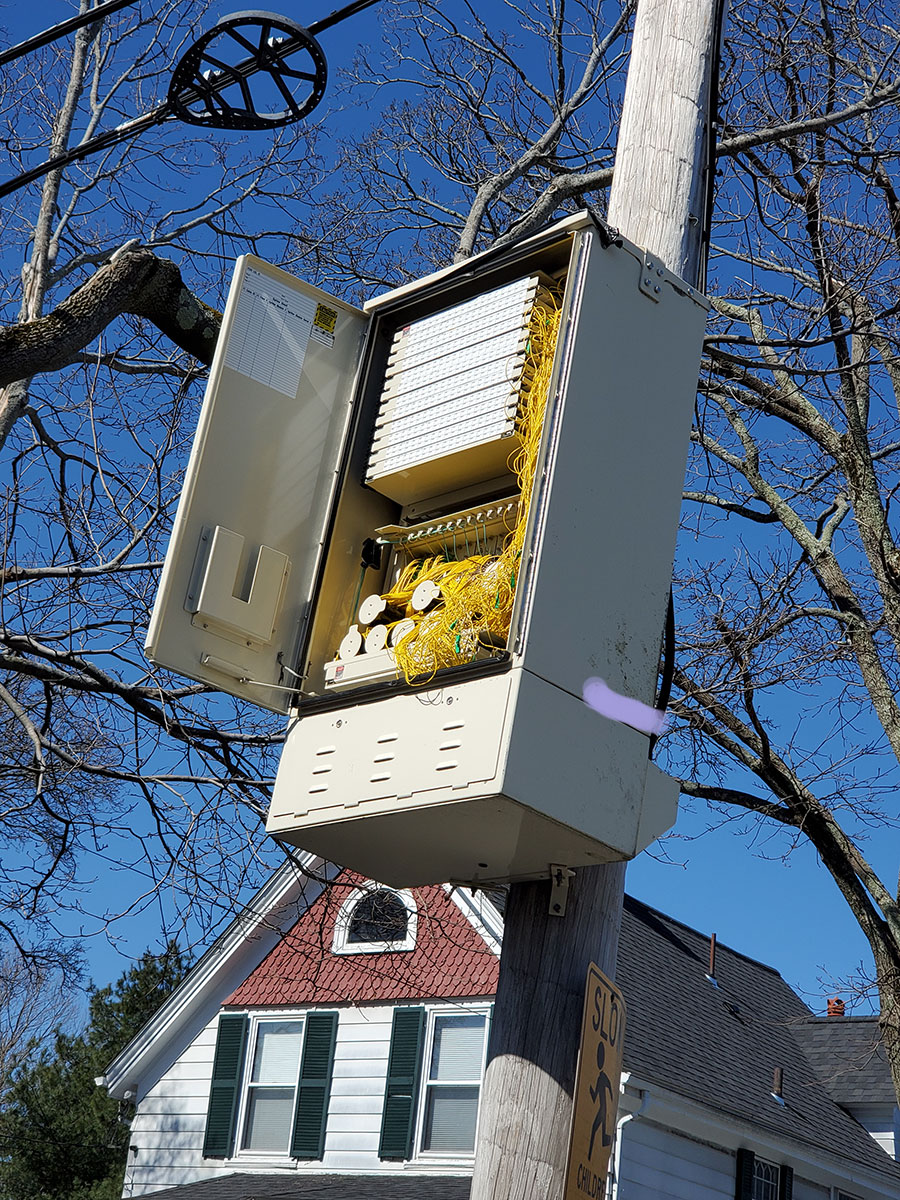
Review: Even the ones that speak English can not comprehend what you say. It is DEI, You must be at least Partially retarded or have the IQ of a lugnut to work phones for them. Their own phone system is the worst Tried for two weeks to alert them to a box that blew twisted on pole in front of my house and the door blew off in my yard. Even the police had a problem and was not able to let them know. Two weeks of rain and rodent exposure for switches and wiring. I am so glad that there are cable companies as alternatives.
Name: jimmy
Title: Bad service/Lies
Review: They don\'t stand by their offers
Name: Barbara Kintz
Reply: They should!
Reply Name: Eric
Date: 2024-04-08 09:22:39